
Blog · Guide · · 5 min read
Run a Weft site in Docker or on Proxmox
Already have a server that runs containers? A Weft site can live there, as one Docker container or a Proxmox container, without touching the host's own network. We ran both, joined them to an office, and sent traffic between them.
Plenty of offices already have a machine that runs containers: a NAS, a small Proxmox server, a Linux box running Docker. Until now, a Weft site needed a machine of its own running Ubuntu. Now it can also be a container on a machine you already have. There's one image for Docker and one template for Proxmox, and the console gives you the exact command to paste.
As always, we ran it before writing about it. On 3 October 2026 we started a Docker site and a Proxmox site, joined both to the same office, and sent traffic between them. Cloud machines stood in for office hardware. The results are below, along with one thing a host needs that is easy to miss.
What's in the container
The container is a complete small Weft site, not just the agent. It holds Ubuntu 24.04, its own init system (systemd), FRR for routing and the Weft agent: the same system a Weft box runs. That's deliberate. The agent gets exactly the environment it was written for, so a container site behaves like any other site.
It always gets a network of its own. A Weft site manages the routes, firewall and interfaces of the network it runs in. Given the host's own network (--network host in Docker), it would rewrite the host's routing and firewall and cut off everything else on the machine. So it runs on Docker's normal bridge network or, on Proxmox, as an ordinary container with its own network card.
What the host needs
- Linux with the
wireguardandvrfkernel modules. A container uses the host's kernel and cannot add modules to it. Ubuntu, Debian and Proxmox hosts have both already. - A privileged container. The site runs its own init system and sets up WireGuard and routing inside its network.
- For Docker: an amd64 or arm64 machine; the image covers both. For Proxmox: amd64.
One host in our run did not meet the first point: Docker on a Mac. On a Mac, Docker runs inside a small Linux virtual machine (we used colima), and that machine's kernel had WireGuard but not vrf. The site joined, then could not apply its settings. Installing the extra kernel modules inside that virtual machine (linux-modules-extra) fixed it. The container now checks for both modules when it starts. If one is missing, docker logs says which, instead of the site failing later with "operation not supported".
1. Docker
In the console, open Add a Linux node. Name the site, choose is a container (Docker, Podman) under This machine, and press Continue. The console shows the command, with the site's one-time invitation already in it:
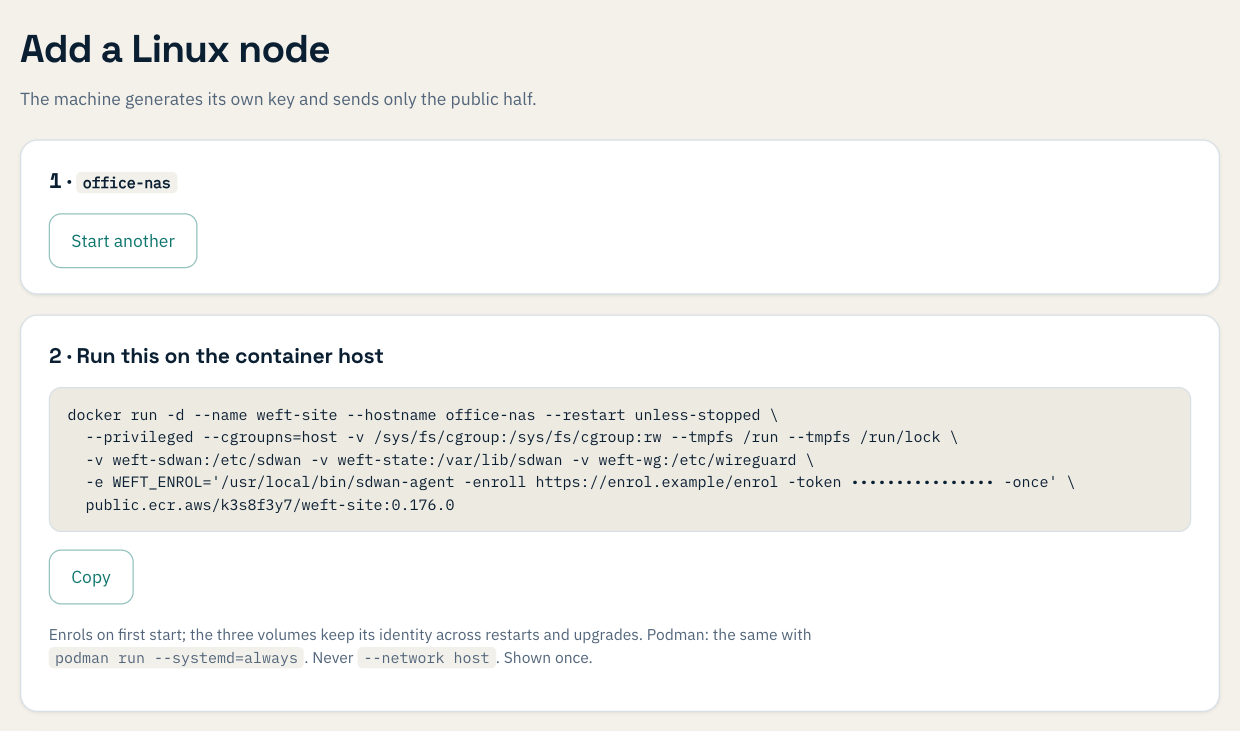
Run it on the Docker host. The site joins on its first start; the invitation is then deleted from inside the container and cannot be used again. The three volumes hold the site's identity and keys, so it keeps them when the container is restarted or recreated.
We ran this on Ubuntu 24.04 with Docker 29, on Docker's default bridge network. The site sits behind the host's address translation (NAT), like any site behind an office router.
- The site joined, came up to the office's hub and exchanged routes with it.
- Pings across the network got every reply.
- Nothing of Weft's appeared on the host: its routes, interfaces and firewall were exactly as before.
- We then removed our local copy of the image, pulled the published one and ran the console's command again. It joined and reported healthy.
Podman runs containers with their own init system natively: the same command, with podman run --systemd=always. We haven't tested Podman ourselves yet.
2. Proxmox
Choose is a Proxmox container instead. Proxmox builds containers from template files, so the console offers one to download, with its checksum and the commands to run:
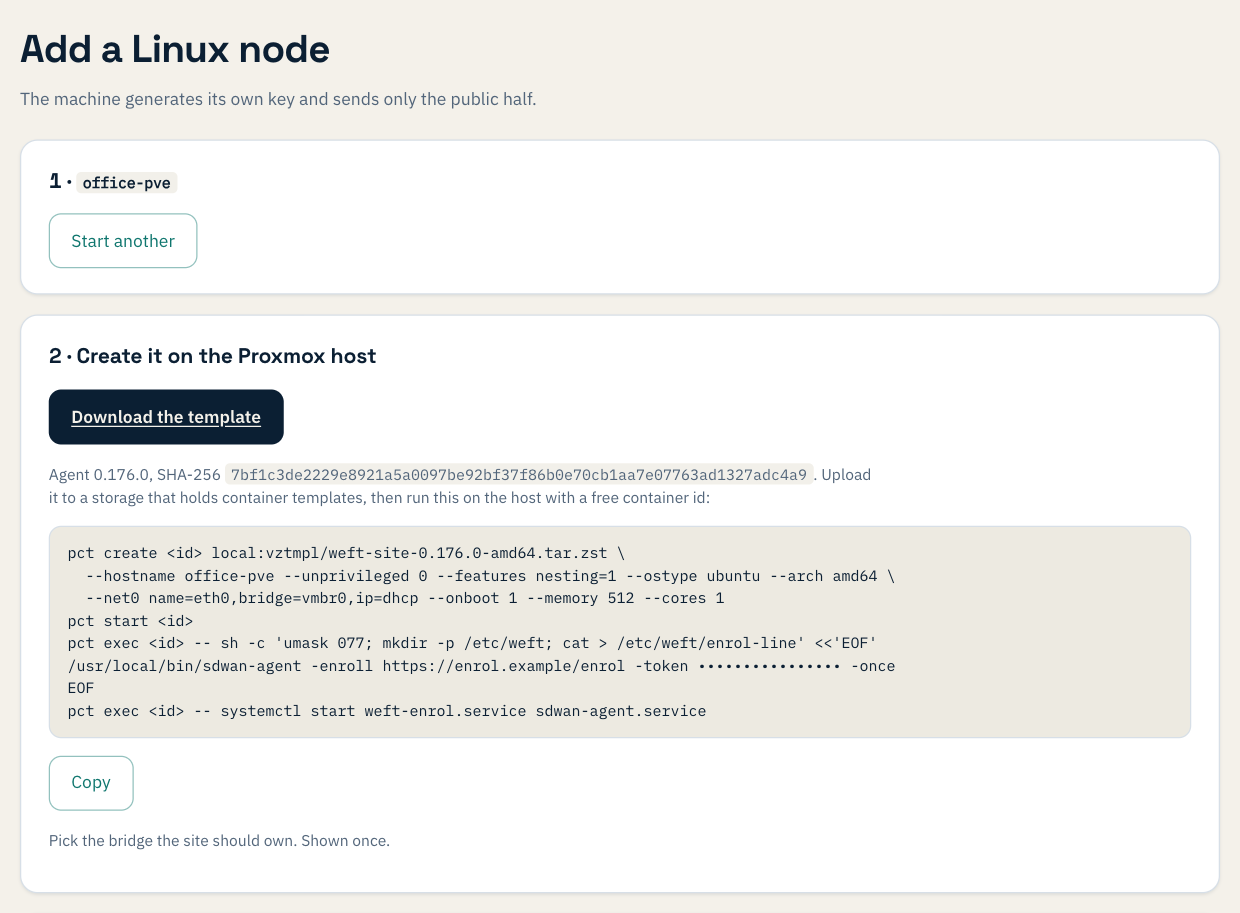
Upload the template to a Proxmox storage that holds container templates (local does by default), pick a free container ID, and run the commands on the host. Change vmbr0 to the bridge the site should own. Two of the settings matter:
--ostype ubuntulets Proxmox set up the container's network and DNS. Withunmanaged, the container gets no DNS and cannot reach Weft to join.- Proxmox starts the container's init system directly. So the invitation goes in with
pct exec, rather than as a setting the way Docker takes it.
We ran this on Proxmox VE 9.2, as a privileged container on a bridge behind NAT. The site joined and reached the hub, and the Proxmox host's own routes and firewall were untouched. We haven't tried an unprivileged container.
Two sites, both behind NAT
Our Docker site and our Proxmox site were each behind their host's address translation, so neither could accept a tunnel from the other. Weft tries a direct tunnel first. When neither end has had a reply for 10 minutes, it routes that pair through the hub instead. That's what happened here. Once it did, pings between the two sites got every reply, in both directions. Sites in containers follow the same rules as any other site, and so do sites behind ordinary office routers.
Keeping it up to date
A container site is a site: it shows on the Sites page, is monitored and alerted on like any other, and counts as one site on your plan. The image and template are published for each agent version, and the console always offers the one your organisation runs. Because the identity lives in the volumes, a container can also be replaced with a newer image without joining again. We haven't yet tried an upgrade in a container; we'll write it up when we do.
What we have not tested
- Podman, and unprivileged Proxmox containers.
- A Docker site with a network port of its own (macvlan, or a network card moved into the container), so that it can be the office's gateway. All of our runs used a bridge behind NAT.
- Upgrading a container site to a new agent version.
If you try any of these before we do, we'd like to hear how it went: support@weftnetworks.com.