
Blog · Guide · · 4 min read ·
Applications: say who may use what, not who is on which network
Describe the systems your people use as applications: where each one lives, by address or by name, and on which ports. Then say which groups may use it. Everyone else is kept out, a group change in Entra or a device that fails a health check takes access away within minutes, and every application shows who used it.
Most networks are built around places: the office LAN, the finance VLAN, the VPN that drops you somewhere in the middle. Who can reach a system follows from where they sit. That is not what anybody actually means when they decide access. They mean: Finance may use the accounts server. Nobody else needs to.
Weft now lets you say exactly that. You describe the systems your people use as applications, and you say which groups may use each one.
What an application is
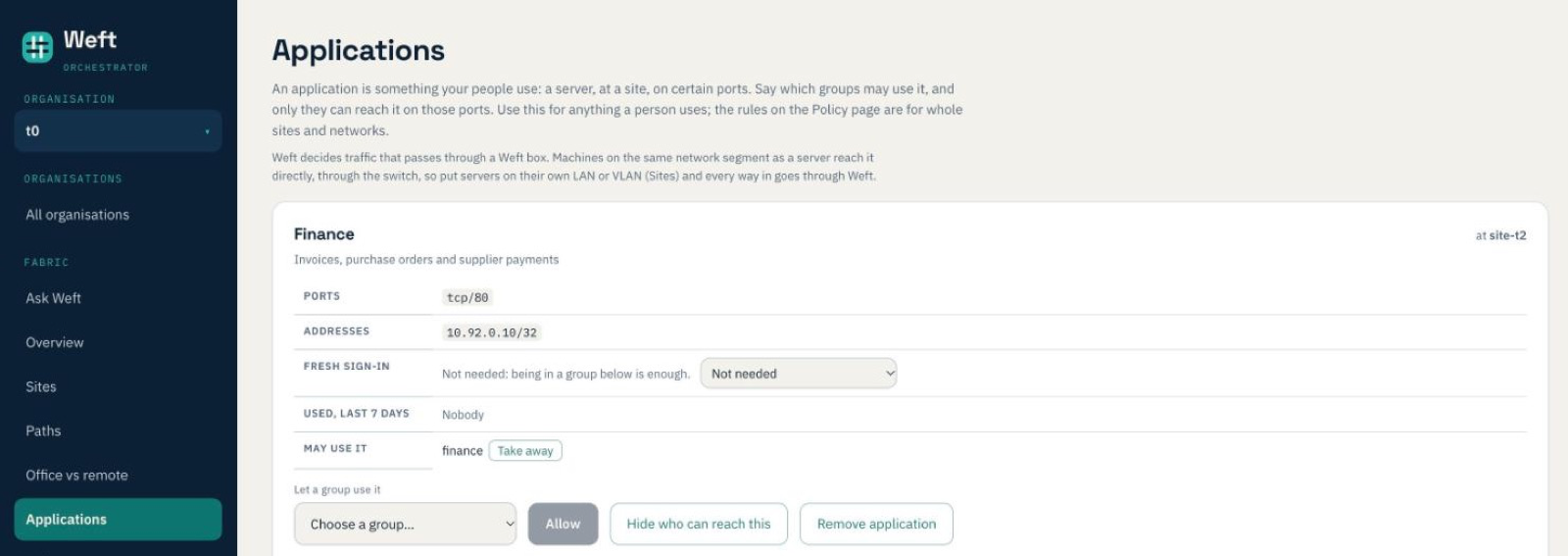
An application is four things:
- A name people recognise, such as Accounts or the file server.
- Where it lives: the site it is at.
- Its addresses, or its names. Give an address (10.50.1.20) or a name (accounts.office.internal). A name is looked up by the site the application lives at, with your own DNS, so when the server moves the access follows it.
- Its ports: Web (HTTPS), Remote desktop, SSH and File share are one tick each, and anything else, ranges included, you type:
tcp/8443,udp/5000-5010.
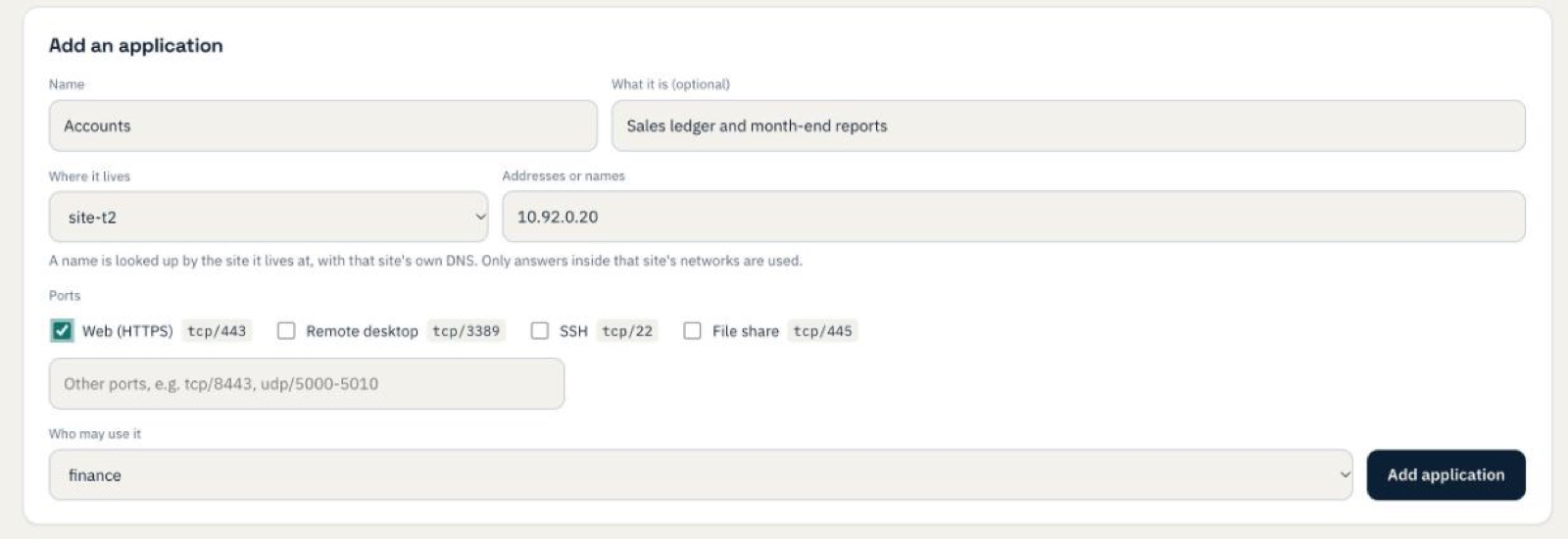
Then you say who may use it: a group. Groups can follow your Microsoft Entra groups, so "Finance may use Accounts" means whoever is in Finance in Entra, on whichever of their laptops are signed in.
Everyone else is kept out
With policy enforced, an application can be reached only on its ports, and only by the groups allowed to use it. Laptops on the move, the other offices, the guest VLAN: none of them get a connection unless their group may use it. Weft checks this at the box the traffic comes through, before it is encrypted. The Policy page lists what was refused, so the first person who should have had access and didn't is easy to spot.
One thing to know: Weft decides traffic that passes through a Weft box. Two machines on the same network segment talk to each other directly, through the switch, so the accounts server and a desk on the same VLAN as it are not kept apart by this. Put servers on their own LAN or VLAN (the Sites page does this) and every route to them goes through Weft.
If policy is still in log mode while you try things out, the Applications page says so: nothing is kept out yet, and the page shows what enforcing would allow.
Who can reach this, and what can this person reach
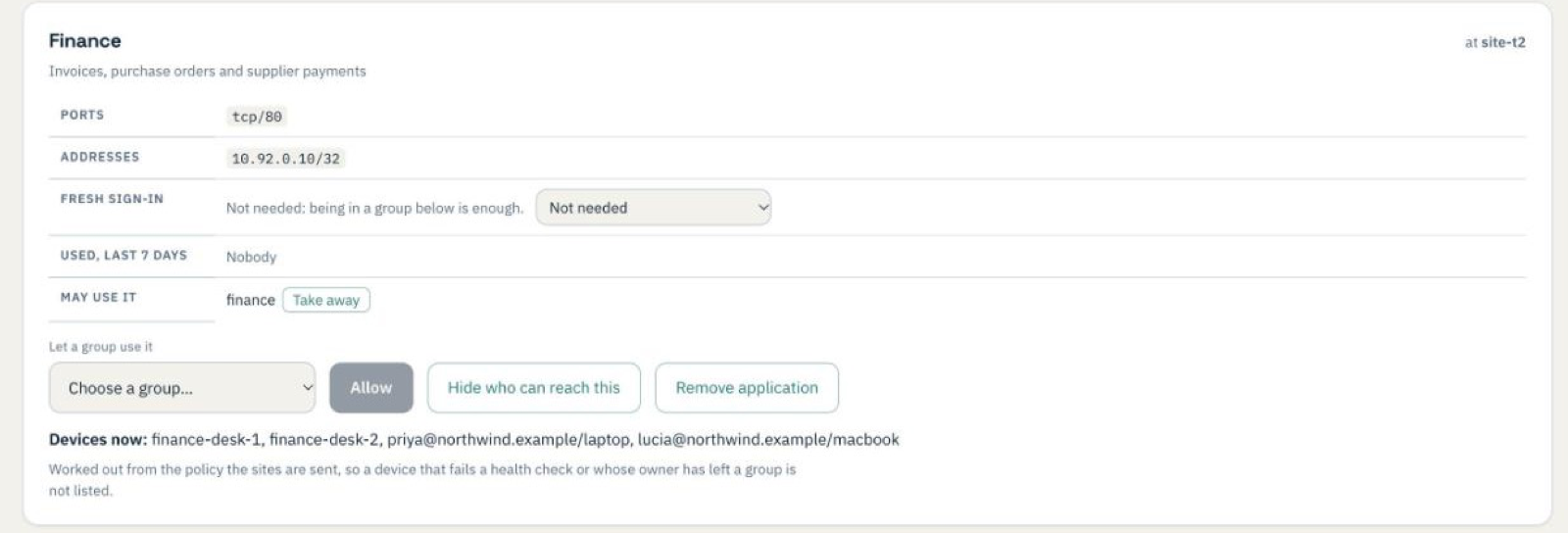
Every application has a Who can reach this? button: the groups, and the devices in them right now. Every person on the Accounts page and every device on Clients has Can reach…: the applications they can use, on which ports, through which group, and when they last did. Both answers come from the policy the sites are enforcing, not from a separate list, so they cannot drift apart.
Access that changes when things change
Access is only as good as how quickly it is taken away. Three things now take effect within minutes, not at somebody's next sign-in:
- Leaving a group in Entra. Move someone out of Finance in Entra and their devices lose Accounts at Weft's next directory check, every two minutes. (This needs one more Microsoft Graph permission, GroupMember.Read.All; the Settings page walks you through it.) Joining a group arrives the same way, through the usual canary check.
- A device that stops being healthy. A group can require that its devices are encrypted, have a firewall, lock their screen, have secure boot or System Integrity Protection, or have antivirus switched on and up to date. Mac and Windows laptops report their health when it changes. One that stops passing leaves the group in seconds. In our test, turning off a laptop's firewall took it out of the group 22 seconds later.
- Somebody leaving. Disabled or deleted in Entra, they are switched off here too, devices included, as before.
Taking access away goes out at once. Giving it goes through the canary like any other change.
Who used it
Each application shows who used it in the last seven days: which devices, whose they are, when they were last used, and on how many hours and days. The site that lets the traffic through notes each new connection to an application. Weft keeps one line per application, device and day for 90 days, so an audit question like "who touched the accounts server last week?" has an answer. The same figures are in the metrics export, for your own Grafana or SIEM.
Your existing rules stay
Rules between whole groups and sites, such as "the offices may reach the internet", stay on the Policy page and keep working. Applications are for anything a person uses; nothing has to be moved across in one go.
Applications are in the console now, under Fabric. Questions, or an application that won't behave: support@weftnetworks.com.