
Blog · Guide · · 6 min read ·
Find any device by name, from any office
Office B could reach the file server at 192.168.50.20, but not as "fileserver". Weft now gives every device in your organisation a name that works from every site, including offices that share an address range, and offices that run their own DNS. Here is how it works, and how we tested it.
Joining two offices together is the easy part. Within a day someone asks why they can reach the file server at 192.168.50.20 but not as fileserver, and why the printer in the other office has no name at all. People use names. Addresses are for routers.
Weft now answers that. Every device in your organisation gets a name that works from every site: laptop.london.weft.internal, nas.paris.weft.internal, or just nas.paris. It also works when two offices use the same address range, and when an office already runs its own DNS server. We tested all of it for real on 8 October 2026, and the results are below.
Switching it on
For organisations created from today it is already on. For an existing organisation, open Settings and set site_names to on. It is off until you do, because it changes the DNS server your devices are handed.

Names live under weft.internal unless you choose your own domain (names_domain, for example office.example.co.uk). .internal is reserved for private networks, so it can never clash with a real website.
Where the names come from
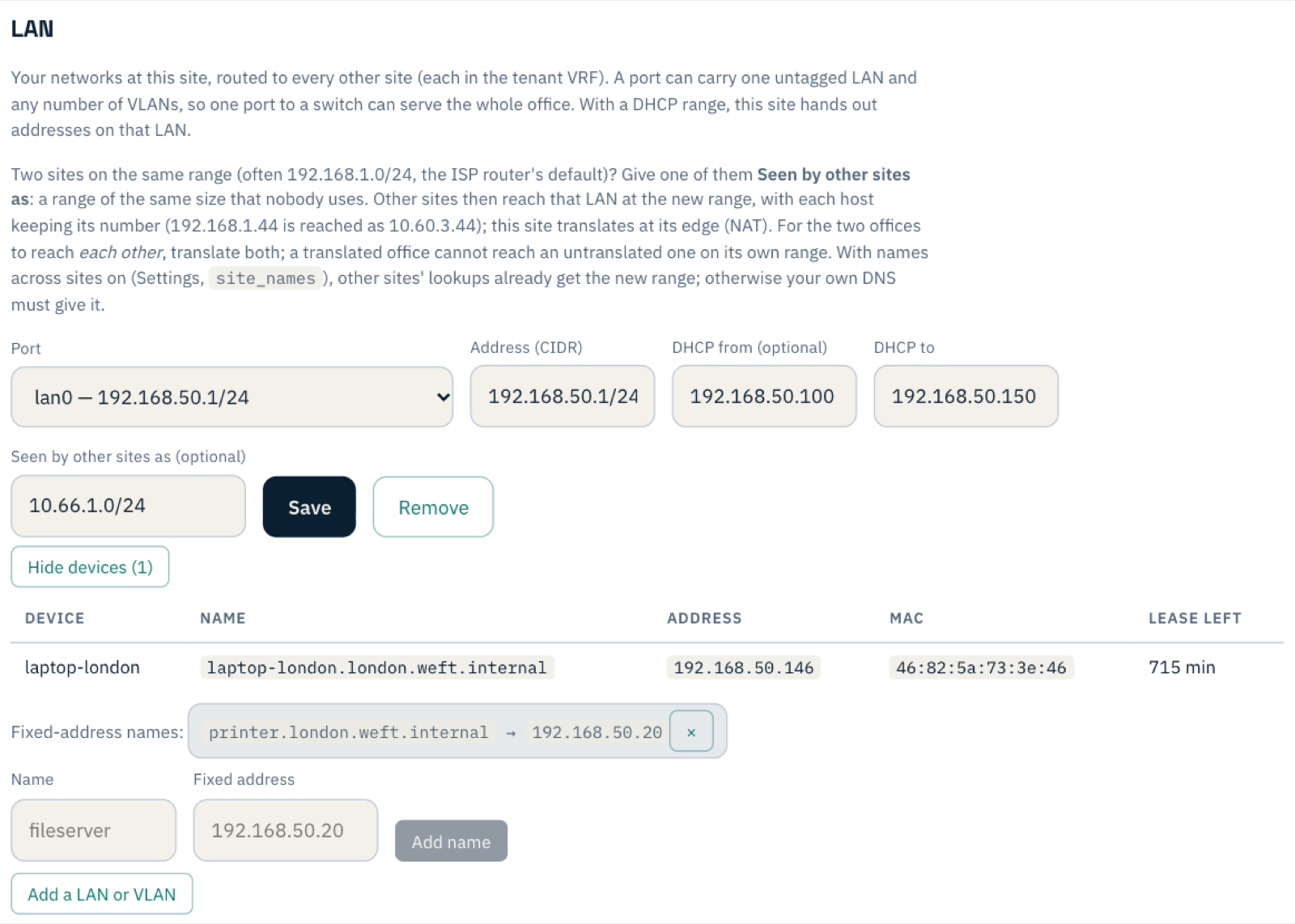
- Automatically. When a site hands a device its address, the device says what it is called. That name becomes
<name>.<site>.weft.internal. A laptop called "laptop-london" at the London site islaptop-london.london.weft.internal. - By hand. File servers and printers usually have a fixed address and never ask for one, so they have no name to give. Add them on the site's LAN under Fixed-address names.
The LAN's device list shows each device's full name, so you can see exactly what other offices will look it up as.
How it works
Your Weft sites already know every device's name: each site reports the addresses it hands out. So the console builds the full list of names in your organisation and sends it to every site. Each site then answers lookups for those names itself, on its own LAN address.
On a LAN where the Weft site hands out the addresses, devices are given the site as their DNS server. The site answers your organisation's names and passes every other lookup to the same internet resolver devices used before. It also hands out a search list, so at the London office a plain printer works, and nas.paris works from anywhere.
Because every site holds the whole list, a name still resolves when the office it belongs to is offline. You get "no route", not "no such name", which is the more honest of the two errors.
Two offices, one address range
Most broadband routers ship with the same few address ranges, so two offices often end up on, say, 192.168.50.0/24. Weft already handles that with Seen by other sites as: each office is reached from elsewhere at a translated range that nobody else uses.
Names follow the translation. Each site is sent the address it should use, so from Paris the London laptop resolves to its translated address, and at home in London to its real one. Nobody has to keep two sets of records.
Offices that already run DNS
Many offices already have a DNS server: a Windows server, a Pi-hole, a pfSense or OPNsense firewall. Their devices should keep using it, and nobody wants that changed. A natural question is whether Weft could tell devices to use the site only for weft.internal and keep everything else as it is. Not through DHCP, unfortunately: it can hand out DNS servers, but never "this server for that domain".
So the office's own DNS server does the split. On a LAN where Weft is not handing out the addresses, the site answers your organisation's names and nothing else: any other question is refused, so it can never become anyone's general DNS server by accident. Your DNS server forwards just weft.internal to the site's LAN address. The console shows the exact lines to use on that LAN:
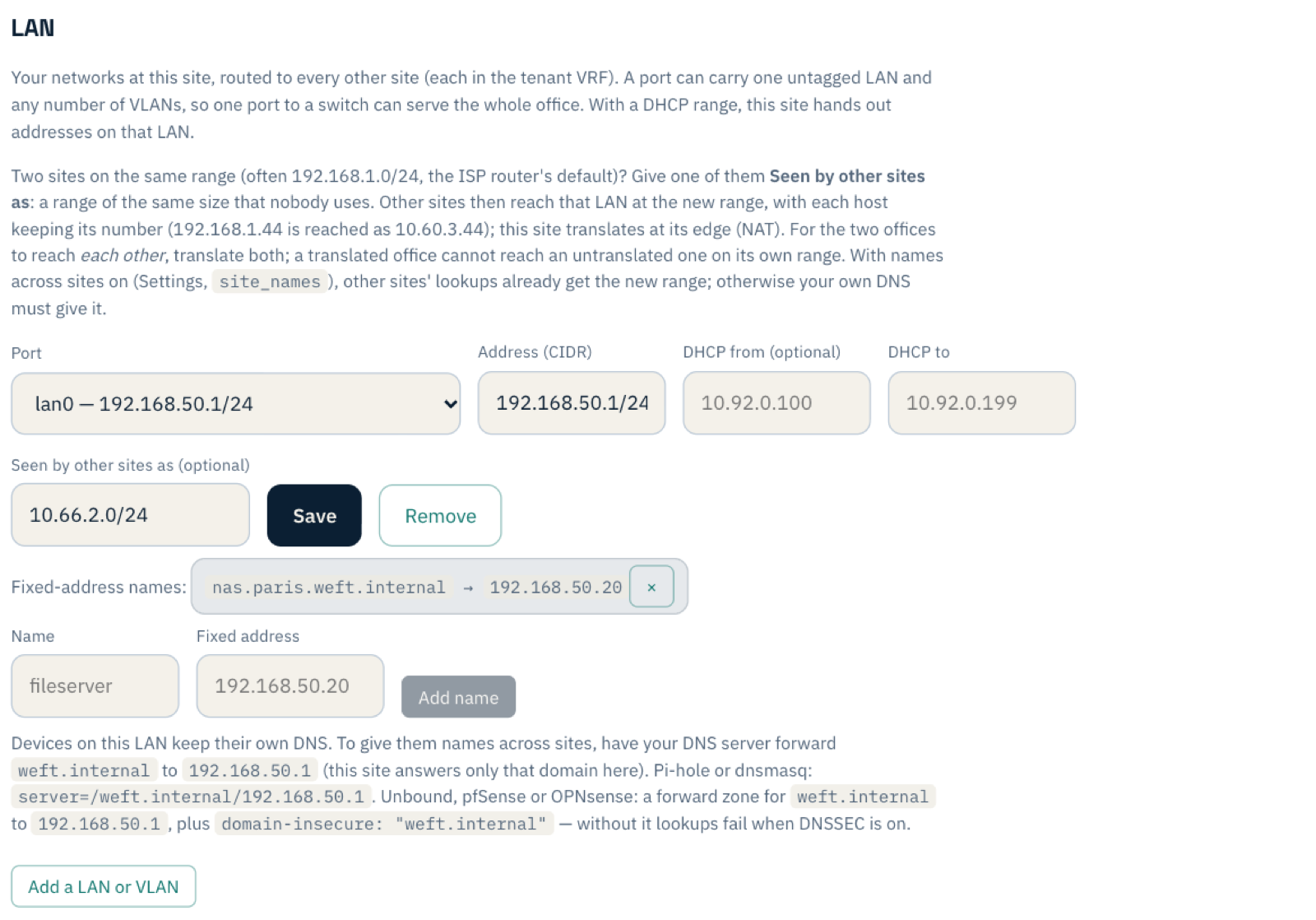
On a Windows DNS server, add a conditional forwarder for weft.internal pointing at the site's LAN address, in DNS Manager or with one line of PowerShell:
Add-DnsServerConditionalForwarderZone -Name "weft.internal" -MasterServers 192.168.50.1
For Pi-hole or anything else built on dnsmasq, it is also one line:
server=/weft.internal/192.168.50.1
For Unbound, the resolver inside pfSense and OPNsense, it is a forward zone plus one line people usually miss:
server:
  domain-insecure: "weft.internal"
forward-zone:
  name: "weft.internal"
  forward-addr: 192.168.50.1
We tested all three. The Windows forwarder and the dnsmasq line work on their own: Windows Server 2022 with its default settings has DNSSEC switched on but no root trust anchor, so it does not reject the answers. Unbound with DNSSEC validation switched on (the default on those firewalls) answered every Weft name with SERVFAIL until we added domain-insecure. The reason is that .internal is provably absent from the public, signed root, so a validating resolver treats any answer for it as forged. With that line added, it worked first time.
How we tested it
As with every guide on this blog, we did it for real on 8 October 2026. We made a fresh organisation, "Northwind", with two sites, London and Paris, enrolled with the same one-line command the console gives you. Small Linux machines in AWS stood in for the offices, and a software stand-in on each played the office's devices. Both offices used 192.168.50.0/24, translated to 10.66.1.0/24 and 10.66.2.0/24, and London was the organisation's internet exit.
- London: Weft hands out addresses. A laptop asked for one, calling itself
laptop-london, and was given the site as its DNS server and the search list. A printer had a fixed-address name. - Paris: an office with its own DNS server at
192.168.50.53, forwardingweft.internalto the site, and a NAS with a fixed-address name. Paris's devices kept their own DNS.
From a device in London:
$ getent hosts printer
192.168.50.20   printer.london.weft.internal
$ getent hosts nas.paris
10.66.2.20      nas.paris.weft.internal
$ ping -c 3 nas.paris
PING nas.paris.weft.internal (10.66.2.20) 56(84) bytes of data.
3 packets transmitted, 3 received, 0% packet loss
From a PC in Paris, whose only DNS server is the office's own:
$ cat /etc/resolv.conf
nameserver 192.168.50.53
$ getent hosts laptop-london.london.weft.internal
10.66.1.146     laptop-london.london.weft.internal
$ ping -c 3 laptop-london.london.weft.internal
PING laptop-london.london.weft.internal (10.66.1.146) from 192.168.50.30 : 56(84) bytes of data.
3 packets transmitted, 3 received, 0% packet loss
$ dig @192.168.50.1 weftnetworks.com     # asking the site for anything else
status: REFUSED
Internet names kept working in both offices: through the site in London, and through the office's own DNS server in Paris. A made-up name under weft.internal came back as "no such name" straight away, rather than being sent to the internet. Afterwards we removed the sites, the machines and the organisation.
Laptops away from the office
A laptop at home or in a hotel reaches your sites through the Weft app, but its DNS belongs to whatever network it is on. So the app does the split itself: names under weft.internal go to your sites, and everything else stays with the DNS the laptop already uses. On Windows that is a name resolution policy rule; on a Mac it is the system's own per-domain resolver setting. Both come and go with the app's profile, so switching names off removes them.
We tested this on 8 October 2026 too: a Windows Server 2022 machine and a Mac, each connected from outside the office. The Windows machine resolved and pinged an office laptop by name; the Mac, connected to a real site, found two devices on that site's networks by name and pinged one. Both kept resolving internet names through their own DNS. It needs version 1.4.33 of the Weft app for Windows or Mac.
What it does not do yet
- Devices away from the office without the Weft app (anything using a plain WireGuard configuration) do not get these names: the split above is done by the app.
- A Windows DNS server that validates DNSSEC, with a root trust anchor added, would need an exception for
weft.internal, as Unbound does. We tested Windows with its default settings, which do not validate. - Plain names from another office: at Paris, plain
nasworks, but London's laptop needslaptop-london.london. That is deliberate: two offices can each have a "printer".
Names across sites is live now. If you look after several offices and want to try it, start a free trial. New organisations have it switched on from the start.