
Blog · Guide · · 4 min read
One cable, every network: VLANs on your Weft box
Staff, guests and phones on separate networks, all on one port to the switch. Each VLAN becomes its own LAN with its own addresses, reachable from the other offices. And if the switch sends a VLAN nobody set up, Weft says so.
Most offices have more than one network: one for staff, one for guests, often one for phones or cameras. A switch keeps them apart as VLANs and carries them all to the router on a single cable. Your Weft box can now be that router. Each VLAN becomes a LAN of its own, with its own addresses and DHCP, reachable from every other office, and usable in policy like any other LAN.
As always, a real run. This one used real hardware rather than cloud machines: a small Weft box in our office, with its one spare port, eno1, cabled to a MikroTik router acting as the office switch. The MikroTik asked for an address on every network it was given, so each LAN shows a device as soon as it works.
What you need
- A Weft box with a port facing the office, set up as in the earlier guides (reach the printer at the other office).
- A switch port set up as a trunk: the untagged network if you want one, plus the VLANs, tagged. On most switches this is called a trunk or tagged port.
- An address range for each network. We used 10.60.VLAN.0/24, so the VLAN number can be read off the address.
1. Add a LAN for each network
Open Sites, then the site. Under LANs, press Add a LAN or VLAN and fill in:
- Name: what the network is for, such as
staff. Policy groups use this name. - Port: the port to the switch.
- VLAN: the VLAN number, or blank for the untagged network.
- Address: the Weft box's own address on that network, which is its devices' gateway.
- DHCP from and to: the range to hand out. Leave them blank if something else on that network already gives out addresses.
We added three: the untagged lan, staff on VLAN 10 and guest on VLAN 20. The MikroTik took an address on each:
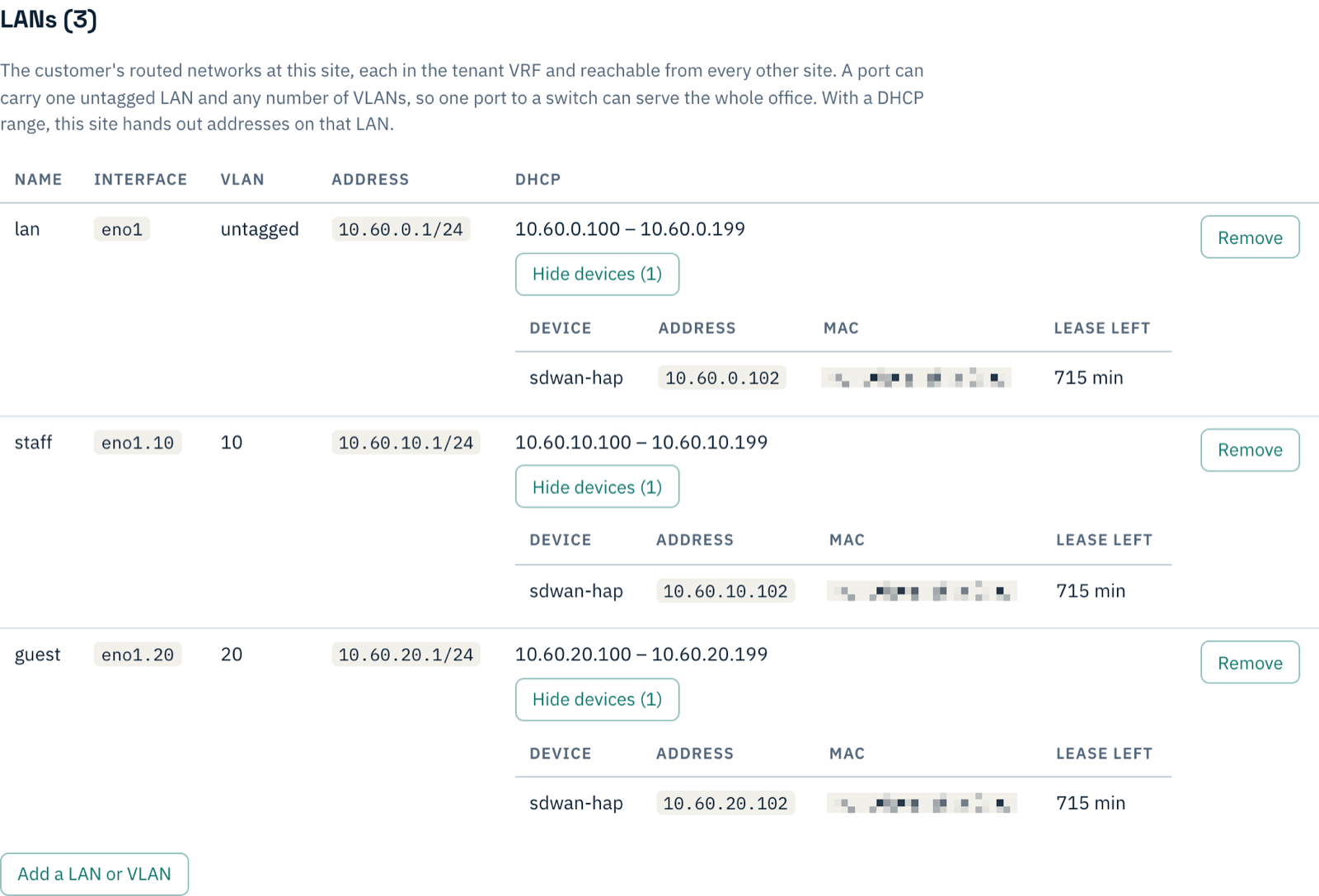
eno1.10 for VLAN 10, and its own DHCP server. Show devices lists what has an address.Every LAN is carried to the other offices in the same way as the office's first LAN, with nothing more to set up.
2. When the switch sends a VLAN nobody set up
The most common VLAN fault is a mismatch: the switch port carries a VLAN the router was never told about. Devices on that VLAN get no address and nobody can tell why. Weft watches for it. To try it out, we added VLAN 30 to the MikroTik and not to Weft. Shortly afterwards the console showed:

It is a ticket and not a page, because the networks you did set up are unaffected. If you have an alert webhook set, it goes there too, and so does the all-clear. It names the VLAN and the port, so the fix is one of two things: take the VLAN off the switch port, or give it a LAN.
3. Give it a LAN
We gave it a LAN, in the same way as before:

08:38:05  VLAN 30 first seen on eno1
08:43:47  phones LAN added in the console
08:44:35  eno1.30 created, DHCP running on it
08:44:42  alert cleared
Under a minute after it was added, the MikroTik had 10.60.30.102 and the alert had cleared on its own: there was nothing to acknowledge.
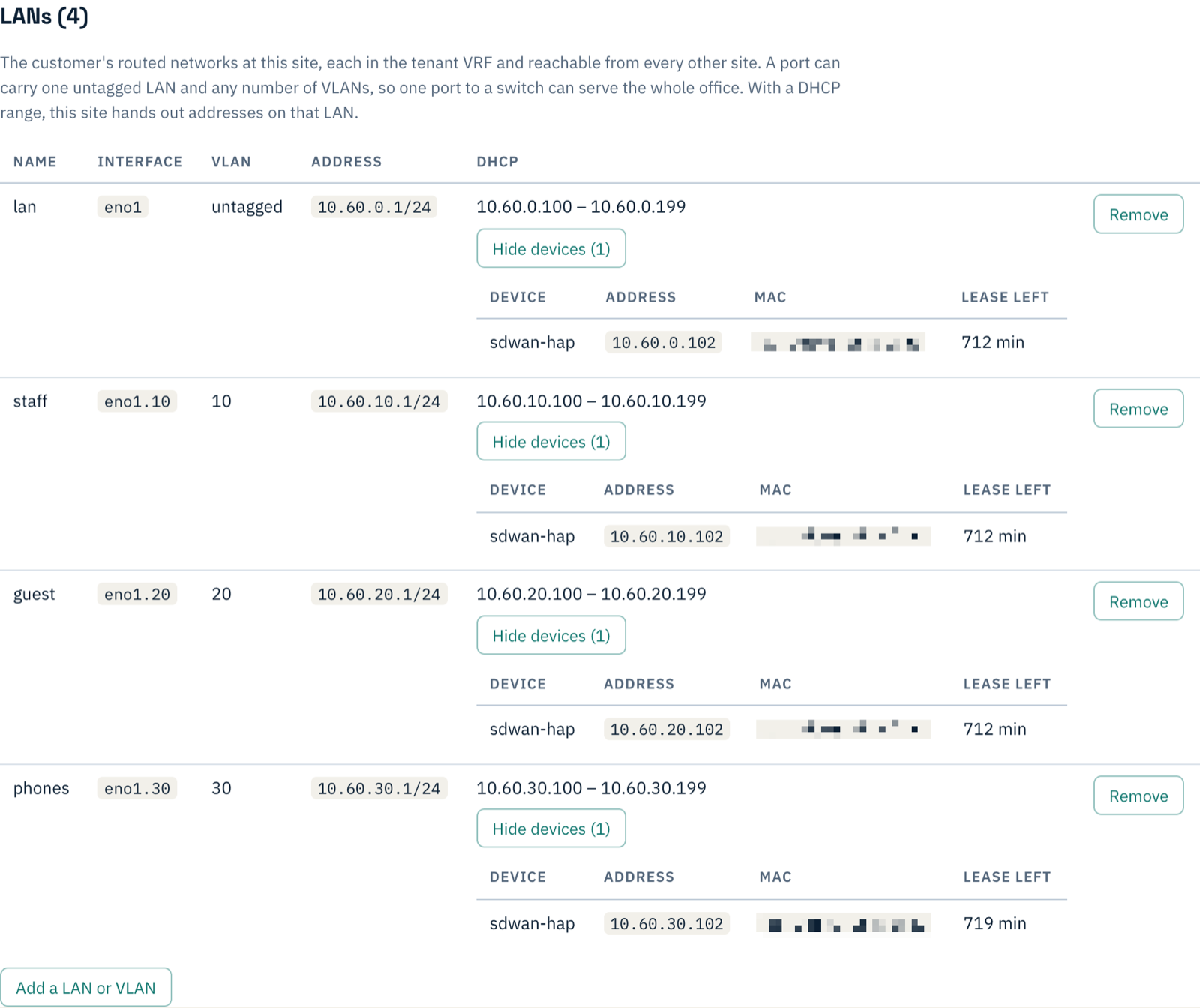
And each network reaches the internet through the Weft box. From the MikroTik, a ping to 8.8.8.8 from its address on each VLAN:
from 10.60.10.102 (staff)    sent=3 received=3   avg 12.7 ms
from 10.60.20.102 (guest)    sent=4 received=4   avg 11.2 ms
from 10.60.30.102 (phones)   sent=3 received=3   avg 10.7 ms
Things to know
- One untagged network per port. A port can carry any number of VLANs but only one untagged LAN, because untagged traffic has no number to tell networks apart.
- A port with only VLANs has no address of its own. If there is no untagged LAN on the port, Weft removes any address the bare port had. Otherwise that port would answer on the untagged wire, outside your networks.
- Separate networks, not separate rules. VLANs keep networks apart on the cable. Once traffic reaches the Weft box it is routed, so a guest VLAN can reach staff unless policy says otherwise. To keep guests away from your servers, put each LAN in a group: keep the guest network away from your servers.
- Interfaces Weft did not make are left alone. If there is already a
eno1.30on the box that Weft did not create, Weft refuses to replace it and tells you, rather than deleting it.
If something does not work
| What you see | What it means |
|---|---|
| An alert that a VLAN is arriving and no LAN is set up for it | The switch port carries a VLAN Weft does not know. Add a LAN for it, or take it off the switch port. |
| A LAN shows no devices, and there is no alert | Nothing on that VLAN is reaching the Weft box. The switch port is probably not tagging it: check the port's VLAN list. |
| Devices get no address, but work when given one by hand | The LAN has no DHCP range. Add one, or check the network's own DHCP server. |
| Devices on the untagged network work, VLANs do not | The switch port is an access port, which carries one network only. Make it a trunk. |
What you have now
One cable from the Weft box to the switch, carrying every network in the office, each with its own addresses and reachable from the other offices. And if the switch is ever set up differently from Weft, an alert tells you which VLAN and which port.