
Blog · Guide · · 5 min read
Two clouds and the office, with static routes both ways
An office, an app in one AWS region and its database in another, all joined with no VPN gateways and no peering. Two kinds of static route make it work: Weft's, to the servers, and each cloud's, back again. Tested, including what happens without the second kind.
Most organisations end up with more than one cloud network: an app in one region, a database in another, perhaps a second provider entirely. Joining them to the office and to each other usually means a VPN gateway per network, peering between the clouds, and a list of routes that has to be kept in step everywhere. With Weft each network is simply a site, and the routing comes down to two kinds of static route: Weft's, which tell the fabric where the servers are, and each cloud's, which send the replies back. Forget the second kind and nothing works, while everything looks healthy.
As always, a real run. We used two AWS regions, Ireland and North Virginia, as the two clouds. An app server in Ireland and an orders database in Virginia sat in private subnets with no public addresses. A PC at the office asked both for a page every ten seconds, and the app server asked the database.
What you need
- The office set up as in the earlier guides, with its LAN on its Weft box and its router sending the cloud ranges to it (reach the printer at the other office).
- In each cloud network, a small Weft box with a second port on a subnet of its own, as in your cloud VPC as just another office. We called these the edge subnets, 10.92.1.0/24 and 10.93.1.0/24.
- Your servers in a different subnet from the box's port. That is the usual shape of a cloud network, and it is what the static routes are for.
Before
office PC   app server 10.92.2.20: no answer   database 10.93.2.20: no answer
app server  database 10.93.2.20: no answer
The three sites were enrolled and healthy. Nothing knew where the server subnets were.
1. A static route in Weft for each server subnet
Each cloud box can reach the rest of its network through the cloud's own router, which in AWS is the first address of the box's subnet: 10.92.1.1 in Ireland. Open Routes and add the server subnet with that router as the next hop, kind customer network, at that cloud's site:
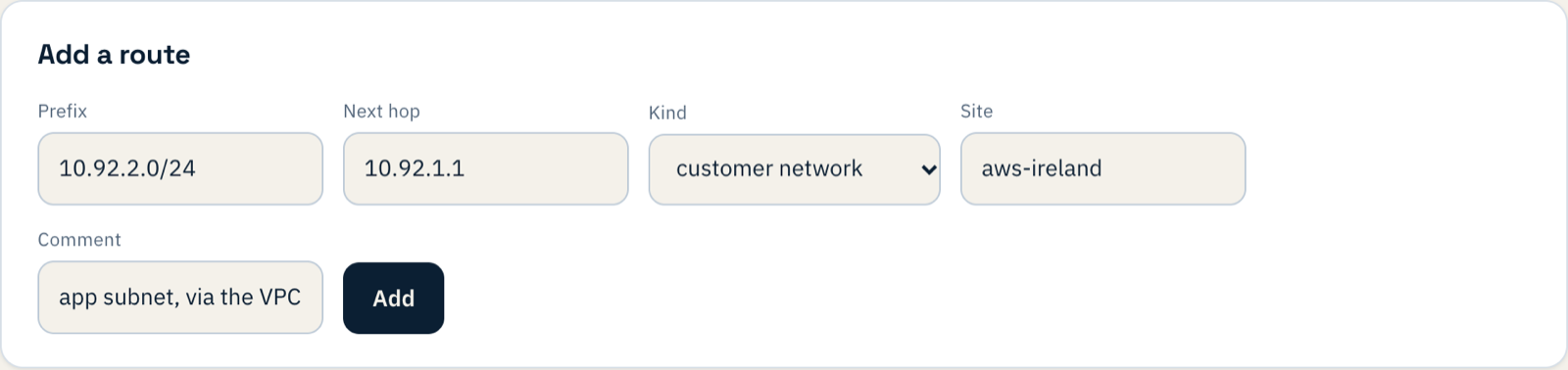
And the same for the database subnet in Virginia:

A customer network route is carried to every other site, so the office and the other cloud learn the way without any change of their own.
What happens now: requests arrive, and nothing comes back
We ran with only these routes for a while, and logged every connection attempt the servers received:
app server  13:42:34  connection attempt from 10.91.1.50 (the office PC)
database    13:42:38  connection attempt from 10.91.1.50
office PC   13:42:42  app server: no answer   database: no answer
The office's requests reach both servers. Each server answers, and the answer goes nowhere: its subnet's route table has no idea where 10.91.1.50 is. In the console everything is green, because from Weft's side everything is right. This is the half that is easy to forget.
2. The routes back, in each cloud's route table
Each server subnet's route table needs an entry for every network that should reach it, pointing at the Weft box's port on that cloud's edge subnet. In Ireland:
10.91.1.0/24    the office LAN             → aws-ireland's edge port
10.93.2.0/24    the Virginia database      → aws-ireland's edge port
10.252.0.0/24   laptops working away       → aws-ireland's edge port
In Virginia, the same with the Ireland app subnet:
10.91.1.0/24    the office LAN             → aws-virginia's edge port
10.92.2.0/24    the Ireland app server     → aws-virginia's edge port
10.252.0.0/24   laptops working away       → aws-virginia's edge port
The target is the box's network interface, not the instance, and that interface needs its source/destination check turned off, because it forwards traffic that is neither from nor to itself. The servers' security groups must also let those ranges in.
3. Try it
13:43:30  return routes added
13:43:34  office PC    app server: 200   database: 200
13:43:41  app server   database: 200
Four seconds. A route table change takes effect at once, and there is nothing to restart.
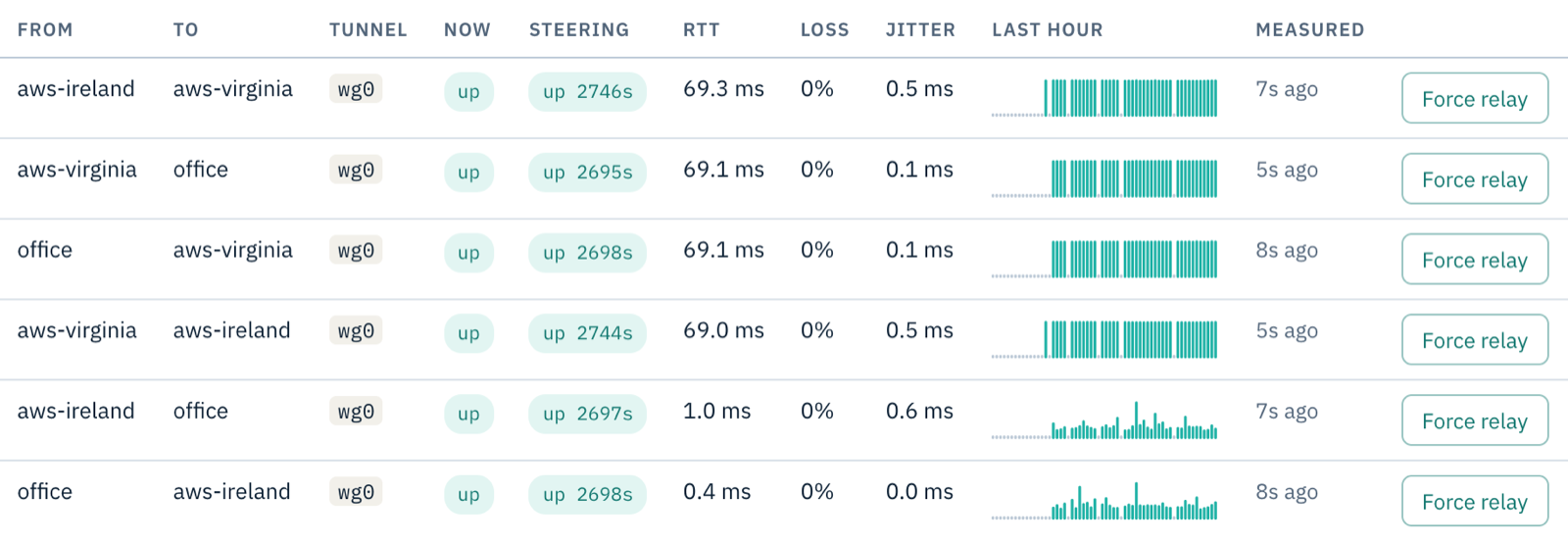
The app server in Ireland now reaches the database in Virginia through Weft, with no peering between the regions. The Paths page shows what that crossing costs:
Another cloud is the same two pieces
Every cloud network has a router that knows its own subnets, and a route table that has to be told about everything else. In Weft, the static route is the same whichever cloud it is. On the cloud side the names differ, and the idea does not: a route to the Weft box's interface for each network that should reach your servers, and permission for that interface to forward. We tested two AWS regions for this guide, not other providers.
If something does not work
| What you see | What it means |
|---|---|
| Servers log connection attempts, and nothing ever completes | The route back is missing (step 2), or points at the wrong interface. |
| Requests never reach the servers at all | The static route in Weft is missing or names the wrong next hop (step 1), or the source/destination check is still on for the box's edge port. |
| The office reaches each cloud, but the clouds cannot reach each other | Each cloud's route table needs the OTHER cloud's server subnet as well as the office (step 2). |
| Every site is healthy, but nothing reaches any other site | No site is a route reflector, so the sites exchange no routes. The first site you add is one; if you removed it, make another site a reflector on its Sites page. |
What you have now
An office and two cloud networks that reach each other directly, with no VPN gateways, no peering and no public addresses on the servers: two static routes in Weft, and the routes back that each cloud needs, written down where you can read them.