
Blog · Guide · · 6 min read ·
Two internet lines, and Teams keeps working
When an office's line fails, Weft now moves Teams, Zoom and the rest of its local breakout to the other line within two seconds, and lets you choose which line each service prefers.
The two-lines guide showed an office riding out a failed line: the tunnels between offices moved to line 2 in under a second, and not one request failed. But not all of an office's traffic goes through those tunnels. Teams, Zoom and the rest of local breakout leave straight from the office to the internet, and until this week they always left by line 1.
So an office with two lines that lost line 1 kept its file shares and lost its calls. We found that while building something else, and fixed it first.
What changed
- Breakout follows a working line. When the line a service uses fails, its traffic moves to the other line. The box notices a dead line the same way it notices a dead tunnel, in about a second.
- It comes back carefully. When the line recovers, the service waits until the line has been up for 90 seconds before moving back, so a line that keeps dropping does not drag calls back and forth.
- You choose which line each service prefers. Put Zoom on the fibre and Microsoft 365 on the other line, or leave everything on line 1, which is what happens if you choose nothing.
Choosing a line per service
In Settings, set breakout_lines to a list of services and lines, for example:
zoom=2, microsoft-365=2
The services are microsoft-365 (whatever you chose on the Microsoft 365 page), custom (your own list), and the services you turned on in breakout_services, such as webex or zoom. Anything not listed prefers line 1. A site with only one line ignores the setting; it has nowhere else to send anything.
It is one setting for the whole organisation, because "line 2" means each site's own second line, whatever that is at that office.
How Weft knows which traffic is Zoom: by destination address. Each of these services publishes the address ranges that are its own, and Weft routes those ranges, as it does for Microsoft 365 breakout. It does not look inside the traffic to recognise an application, so a service that shares its addresses with others, or publishes none, cannot be given a line of its own this way.
Update, 9 October: Weft can now also recognise a service by name. When a device at the office looks up a name such as zoom.us through the site, the site notes the addresses it hands back, and new connections to them take that service's line. Zoom and Webex come with the names their vendors list as their own; you can add others in Settings as breakout_domains. It only sees devices that use the site for DNS, so a device using private DNS, or an office with its own DNS server, is not seen; and an address a service shares with others takes their traffic too. It is recognition by name, not by looking inside the traffic.

What we measured
A real Weft site with two lines, Microsoft 365 breakout turned on (32 address ranges), and line 1 cut by blocking its traffic, as in the two-lines guide. As in our other guides, a cloud instance with a second network card stood in for an office box with a second line, and a test machine on the site's office network stood in for a PC.
| What we did | What happened |
|---|---|
| Cut line 1 (Microsoft 365 on line 1, the default) | All 32 ranges moved to line 2 within 2 seconds. |
| Put line 1 back | They stayed on line 2 through the 90-second wait, and were back on line 1 two minutes after the restore. |
Set microsoft-365=2 | All 32 moved to line 2 within a minute, with both lines up. |
| Cut line 2, the preferred line | Back to line 1 within 2 seconds; home to line 2 two minutes after line 2 returned. |
| Cut line 1 with traffic flowing: a ping five times a second, and a DNS query from the same source port twice a second | The ping missed 1.6 seconds and then carried on over line 2, the same flow, without restarting. 315 of 317 DNS queries were answered; both misses were in those 1.6 seconds. |
| Line 1 back, with the same traffic | Moved home 100 seconds later: one ping lost, no DNS query lost. |
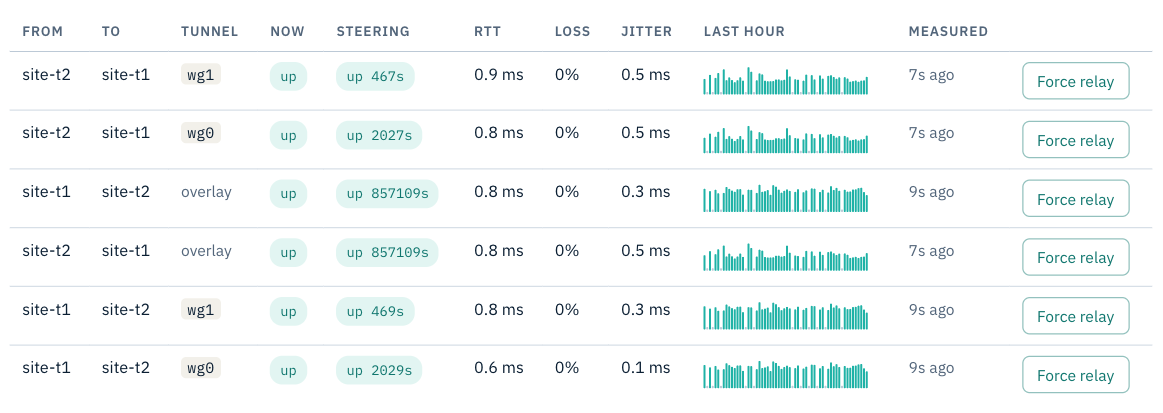
wg0 on line 1, wg1 on line 2).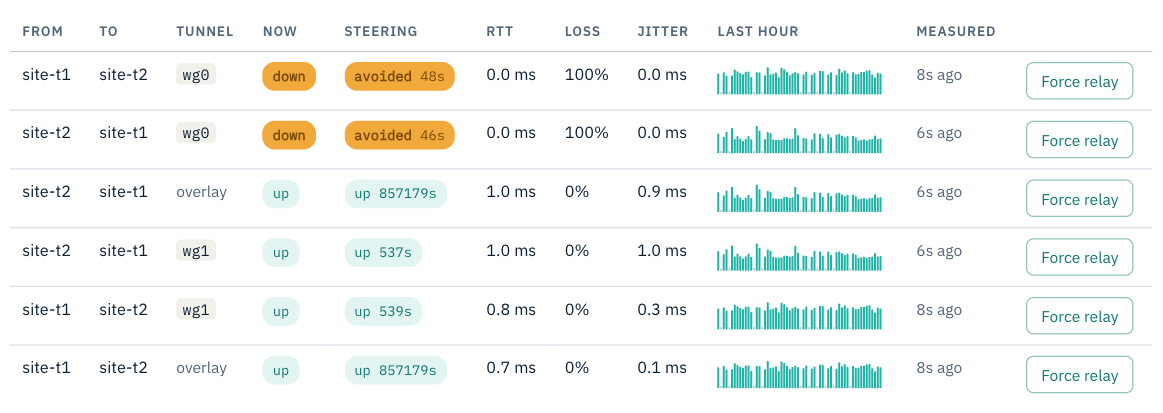
Calls that were in progress
A call that was using the line that failed has to be re-established either way: the line it was on is gone. What matters is that it can be. Your office's traffic leaves each line under that line's own public address, and a call whose connection was set up on line 1 would otherwise go on trying to use line 1's address after the move. So when a service moves, the box forgets the connections it had set up on the old line, and the call's next packet starts afresh on the new one. In our test the box reported clearing two connections at each move, the two flows we were running, and both carried on.
Update, 9 October: choosing by line quality
When this was first published, the line a service used was chosen only by whether the line worked and by your preference, and choosing by how well a line is working was the next piece. It is now built. Set a service to best, for example zoom=best, and each new connection leaves by whichever working line is measuring clearly better: less loss, then less jitter, then less delay, held for 30 seconds so two similar lines do not take turns.
Every connection then stays on the line it started on until it ends, so a choice made on quality never interrupts a call in progress. Only a line that fails moves existing calls, as described above.
We tested it the same way, on a site with two lines. We made line 1 measure worse, with extra delay, jitter and some loss. About a minute later new connections went to line 2. A connection opened before the change sent all 896 of its packets by line 1 and lost none; one opened after it sent all of its packets by line 2. When line 1 recovered, nothing moved back.
What Weft measures: each line two ways, and the worse one counts. Its tunnels to your other sites, and a short test to a public address on the internet out of that line every ten seconds, so a line whose tunnels are fine but whose internet is struggling still counts as struggling. It is not a measurement of the path to Zoom itself, but it is the line most calls depend on. We tested that too: with only line 1's internet side made worse, new connections moved to line 2 within about a minute, and an older connection stayed where it was.
What you have now
An office whose Teams and Zoom follow whichever line is working, and a say in which line each service uses while both are.
More on choosing what leaves each office locally in local internet breakout for Microsoft 365.